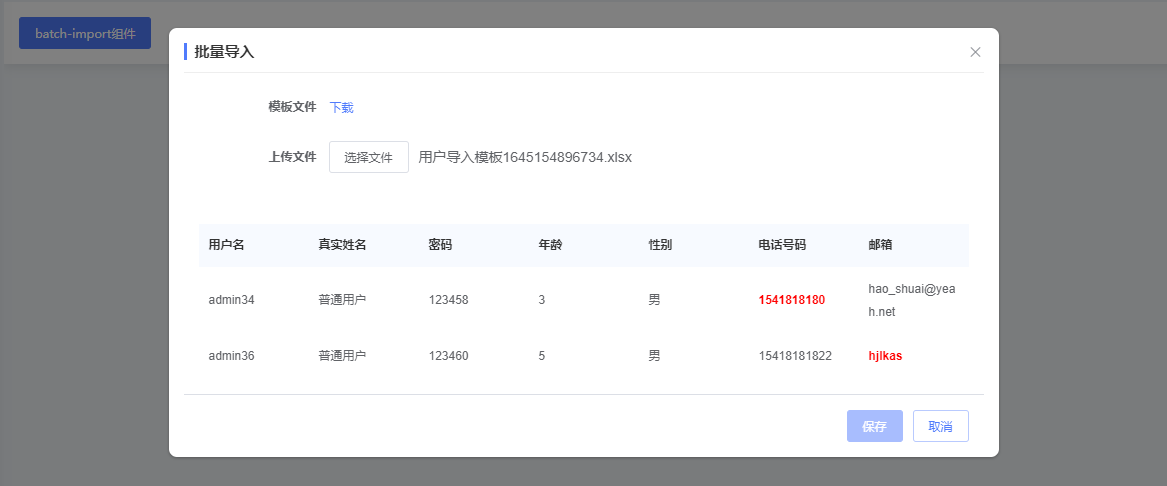
sf-batch-import-dialog 批量导入组件
sf-batch-import-dialog 介绍
1.该组件提供一个.xlsx模板文件下载和.xlsx文件解析的功能;
2.读取.xlsx文件时对有验证规则的属性进行验证,含有未通过的数据时,将无法进行提交。
3.当属性showErrorTable为true时,默认会将错误的数据前10条通过table方式展示,并对出错的列进行高亮显示,鼠标悬浮时会有报错信息提示;
sf-batch-import-dialog Attributes
| 参数 | 说明 | 类型 | 是否为必传参数 | 可选值 | 默认值 |
|---|---|---|---|---|---|
| visible | 是否显示 BatchImportDialog,支持.sync 修饰符 | Boolean | 必传 | ---- | false |
| title | BatchImportDialog 的标题 | String | 必传 | ---- | 批量导入 |
| templateName | 被下载模板的文件名称(文件所在路径默认在public/static/ExcelTpl/下) | String | 必传 | ---- | ------ |
| templateDownloadName | 模板下载后的名字 | String | 可选 | ---- | undefined.xlsx |
| xlsxSettings | 导入Excel文件时设置其读取的行和列 | Object | 必传 | ---- | ------ |
| importAction | 传入一个post请求方法 ,将转化后的Excel数据在保存时提交到数据库中,新增数据 | Function | 必传 | ---- | ----- |
| showErrorTable | 是否显示错误数据的表格 | Boolean | 可选 | ---- | false |
| maxErrorCount | 最大显示异常条数 | Number | 可选 | ---- | 10 |
sf-batch-import-dialog Events
| 事件名 | 说明 | 参数 |
|---|---|---|
| success | 保存数据成功后触发的事件 | - |
| fail | 有数据验证出错时触发的事件 | - |
| success | 导入文件解析异常时触发的事件 | - |
sf-batch-import-dialog 组件使用
<template>
  <sf-batch-import-dialog
    v-if="importDialogVisible"
    :visible.sync="importDialogVisible"
    :import-action="importData"
    template-name="USER.xlsx"
    :template-download-name="`用户导入模板${new Date().getTime()}.xlsx`"
    :xlsx-settings="batchImportSetting"
    show-error-table
    @success="search"
  ></sf-batch-import-dialog>
</template>

<script >
import {
  importData
} from '@/api/XXX.js'

export default {
  data() {
    return {
      importData,
      importDialogVisible: false
     }
  },
  computed: {
    /**
       * 批量导入设定
       */
      batchImportSetting() {
        return {
          // Sheet页的下标
          sheetIndex: 0,
          // 起始行号
          startRow: 3,
          // 导入列设置
          columns: [
          {
            // 封装的数据结构属性
            propName: 'loginName',
            // Excel的列
            colName: 'B',
            label: this.$L_Label('loginName')
          },
          {
            propName: 'realName',
            colName: 'C',
            label: this.$L_Label('realName')
          },
          {
            propName: 'password',
            colName: 'D',
            label: this.$L_Label('password')
          },
          {
            propName: 'age',
            colName: 'E',
            label: this.$L_Label('age')
          },
          {
            propName: 'gender',
            colName: 'F',
            label: this.$L_Label('gender')
          },
          {
            propName: 'tel',
            colName: 'G',
            label: this.$L_Label('tel'),
            validator: val => {
              if (isPhoneNumber(val)) {
                return
              }
              return this.$L_Msg('telNotCorrect')
            }
          },
          {
            propName: 'mail',
            colName: 'H',
            label: this.$L_Label('mail'),
            validator: val => {
              if (isEmail(val)) {
                return
              }
              return this.$L_Msg('mailNotCorrect')
            }
          }
        ]
      }
    }
  },
  methods: {
    openImport() {
      this.importDialogVisible = true
    },
    /**
     * 检索
     */
    search() {
    }
  }
}
</script>
控制组件打开的按钮

sf-batch-import-dialog对话框及错误数据行的显示